Java SSL revocation check
- Kafka describe consumer group Java
- How to list Kafka consumer groups
- Kafka consumer group details Java
- Java Kafka group description
There are two common way to check TLS certificate revocation status:
- Certificate Revocation List (CRL)
- Online Certificate Status Protocol (OCSP)
The second option is a faster and modern way to do that. The OCSP link must be presented some way to do that. There are at least two options:
- Your Certificate Authority (CA) automatically puts that OCSP link into your certificate
- You go to the guys in your CA and ask them for the OCSP link.
This is how you can check whether your SSL certificate contains an OCSP link:
Your cert must contain Authority Information Access (AIA) extension:
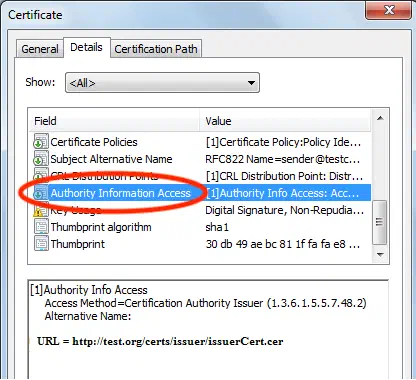
If you don’t see OCSP link in first point, you must scroll down this acticle all the way to section to the second point:
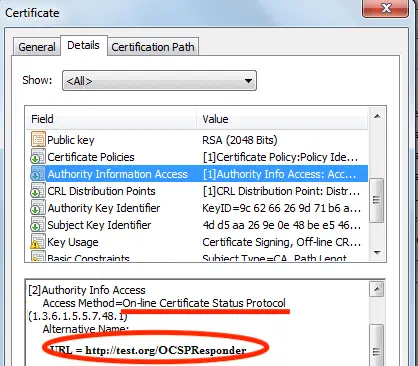
If you certificate contains OCSP link
- Add
-Dcom.sun.net.ssl.checkRevocation=trueflag when you run your jar - Set
Securityproperty from inside your code:java.security.Security.setProperty("ocsp.enable", "true")
After you perform this, every time Java sees new TLS connection, it is going to OCSP CA server through the link from AIA section of TLS certificate, check the revocation status, and reject the connection if the certificate was revoked.
If your certificate does not contain OCSP link
1.Add -Dcom.sun.net.ssl.checkRevocation=true flag when you run your jar
2. Set Security property from inside your code: java.security.Security.setProperty("ocsp.enable", "true")
3. Go to the folks from your CA and ask them for OCSP link
4. Set one more Security property inside your code: Security.setProperty("ocsp.responderURL", url)
P.S.: there might be one case, when OCSP server itself has specific SSL cert. If so, you need to set other Security properties manually:
Security.setProperty("ocsp.responderCertSubjectName", certSubjectName);
Security.setProperty("ocsp.responderCertIssuerName", certIssuerName);
Security.setProperty("ocsp.responderCertSerialNumber", certSerialNumber);
Technical details
If you interested in how this works under the JVM hood, you might want to see this classes:
java.security.cert.PKIXRevocationChecker, class declaration is:
public abstract class PKIXRevocationChecker extends PKIXCertPathChecker
sun.security.provider.certpath.RevocationChecker, class declaration is:
class RevocationChecker extends PKIXRevocationChecker
You can navigate into sun.security.provider.certpath.RevocationChecker class just by pasting this line into IntelliJ IDEA and clicking on the class name with CTL+left click ignoring error (red glow).
You can see, how RevocationChecker.java class reads Security properties in method:
private static RevocationProperties getRevocationProperties() {
    ....
    rp.ocspEnabled = ocspEnabled != null
                     && ocspEnabled.equalsIgnoreCase("true");
    rp.ocspUrl = Security.getProperty("ocsp.responderURL");
    rp.ocspSubject
        = Security.getProperty("ocsp.responderCertSubjectName");
    rp.ocspIssuer
        = Security.getProperty("ocsp.responderCertIssuerName");
    rp.ocspSerial
        = Security.getProperty("ocsp.responderCertSerialNumber");
    rp.crlDPEnabled
        = Boolean.getBoolean("com.sun.security.enableCRLDP");
}